Industry Guides
- Instagram automation
- Boutique business
- Custom designers
- Comment-to-DM
- Instagram sales
- dminsecond
Instagram Comment-to-DM Automation for Boutique Owners and Custom Designers
Turn Instagram enquiries into sales with automated replies, custom design catalogues, instant pricing, and booking links.
Why boutique owners struggle with Instagram enquiries
Instagram is an important platform for boutique owners and custom designers to showcase designer blouses, lehengas, embroidery, and exclusive fabric collections. Reels and posts can attract customers who want to know about prices, customisation options, fabric availability, and appointment bookings.
However, replying manually to every comment can take valuable time. When several customers ask for prices or design details at once, delayed replies may cause potential buyers to lose interest or contact another boutique.
A structured comment-to-DM workflow can help boutique businesses respond more efficiently and guide interested customers towards the right information.
Why basic instant replies may not be enough
A basic instant reply can acknowledge an enquiry, but a boutique may need to share more specific information to help a customer make a decision.
For example, a customer commenting on a designer blouse Reel may want to see the fabric catalogue, customisation options, price range, or booking link. Sending the same generic message to every customer may not answer these questions.
A more relevant messaging workflow can connect a customer's comment with useful product information and a clear next step.
What is comment-to-DM automation for boutiques?
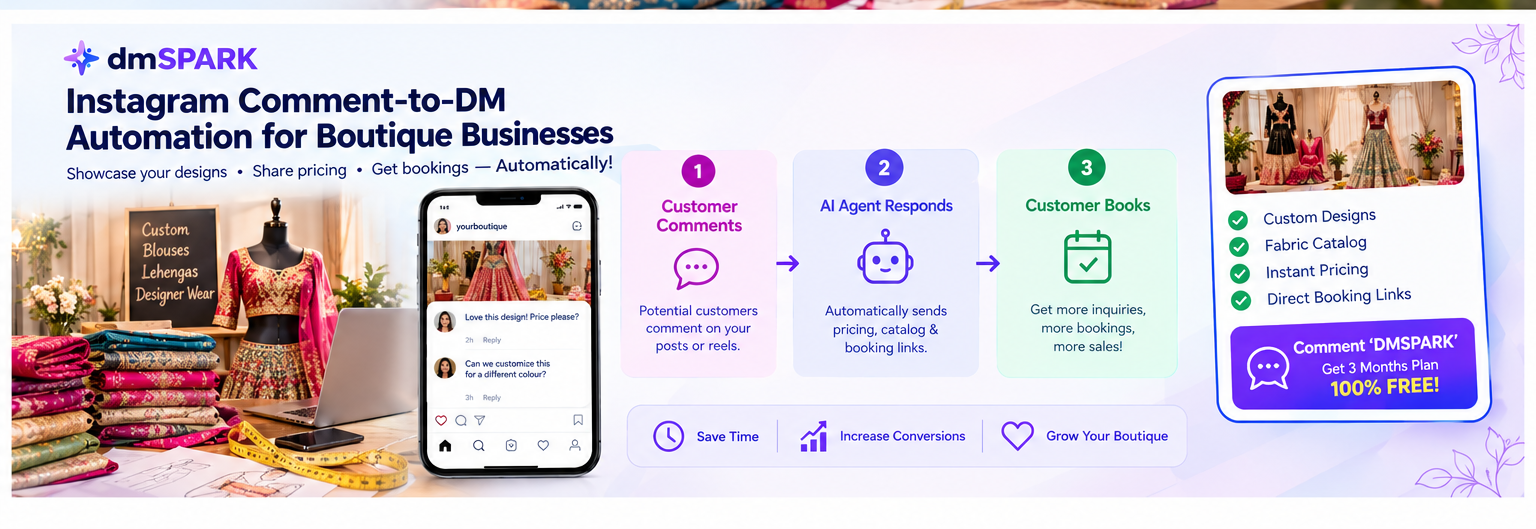
Instagram comment-to-DM automation connects eligible comments on Instagram content with a configured private-reply or messaging workflow. Depending on the connected account, permissions, and supported features, businesses can use this approach to share relevant information with interested customers.
With dminsecond, boutique owners can explore supported automation features for responding to Instagram engagement and delivering configured follow-up messages. Available features depend on the current product offering and Meta platform requirements.
This can help businesses organise enquiries for custom blouses, bridal lehengas, designer collections, and other made-to-order products.
How to automate boutique enquiries with dminsecond
Start by choosing an Instagram Reel or post that showcases a particular design, fabric collection, or custom outfit. Decide what information customers should receive when they express interest.
Configure a suitable comment trigger for the campaign. For example, customers who comment with the keyword DESIGN could receive a configured message containing a relevant catalogue, pricing information, or consultation booking link, where supported.
Prepare your message with clear product details, accurate prices, fabric options, customisation information, and a useful next step. If you include a booking link, test it on a mobile device to make sure customers can access it easily.
Before launching the campaign, test the workflow and verify the connected Instagram account, selected content, trigger words, and actual recipient experience.
Turn design enquiries into a better sales funnel
A sales funnel helps potential customers move from discovering a design to exploring available options and taking the next step towards an order.
For example, a boutique can post a Reel featuring a customised lehenga and invite viewers to comment for the catalogue. An eligible comment can trigger a configured private reply that shares design photos, pricing information, and a link to book a consultation.
This gives customers a clearer path to explore their options without requiring the boutique owner to manually send the same initial details to every interested person.
Automation can improve the enquiry experience, but completed sales still depend on factors such as design quality, pricing, customer service, fitting arrangements, delivery timelines, and customer trust.
Best practices for boutique Instagram automation
Use clear calls to action such as Comment DESIGN for the catalogue or Comment BOOK to explore consultation options. Choose trigger keywords that match the content and avoid overly broad triggers that may match unrelated comments.
Keep messages friendly, concise, and relevant to the design featured in the post. Make it easy for customers to find fabric details, price ranges, customisation options, and booking information.
Keep catalogue images, prices, and availability updated. If prices depend on fabric, embroidery, measurements, or customisation, explain that clearly rather than promising a fixed price that may not apply.
Review current Meta permissions, account eligibility, supported comment surfaces, and messaging limits before publishing. Monitor campaign activity and refine your messages based on genuine customer enquiries.
Grow your boutique business with dminsecond
Ready to spend less time answering repetitive Instagram enquiries and more time designing beautiful outfits? Explore dminsecond to discover the automation features available for your boutique's Instagram workflow.
Use relevant comment triggers, helpful product information, and clear booking links to make it easier for interested customers to explore your collection.
Visit dminsecond to learn more about the platform and find a workflow that fits your boutique business.