Industry Guides
- Instagram automation
- Digital products
- Digital content sellers
- Course creators
- Comment-to-DM
- E-book marketing
- dminsecond
Instagram Comment-to-DM Automation for Digital Content Sellers and Course Creators
Automate Instagram replies and deliver reel-specific e-book, template, and online course links to interested customers.
Why digital creators struggle with Instagram enquiries
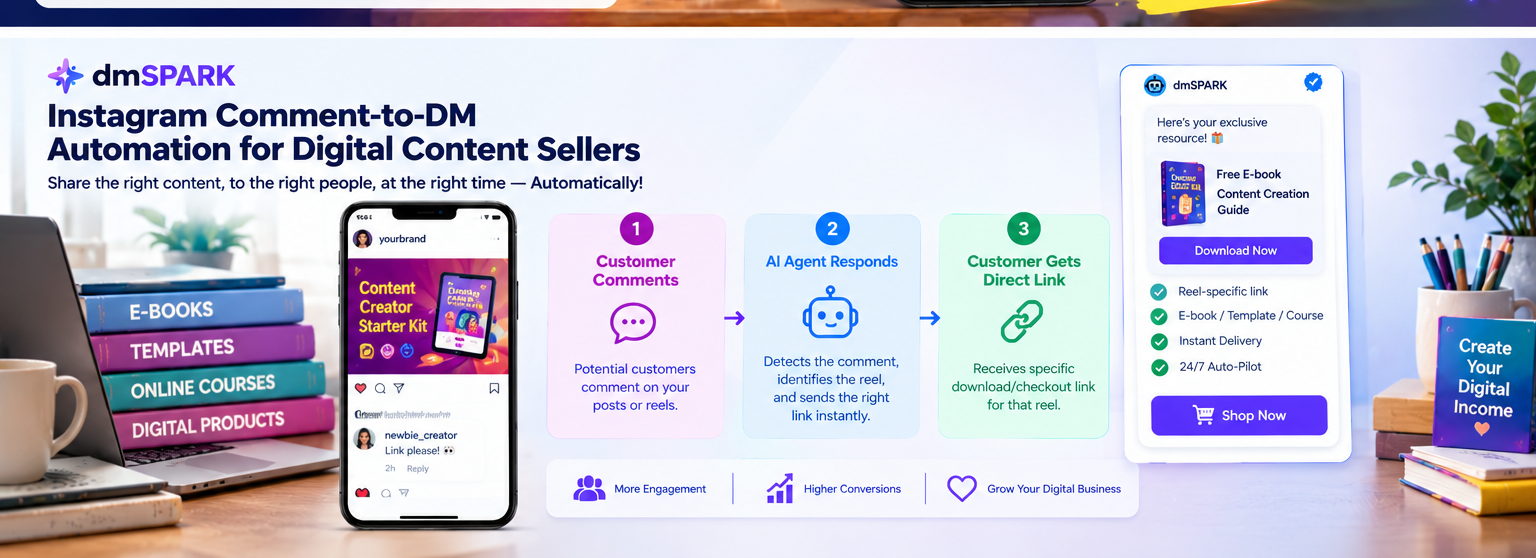
Instagram Reels can help digital creators promote e-books, downloadable templates, online courses, design resources, and other digital products. When a Reel attracts attention, viewers often comment with questions such as 'Link please', 'How can I buy?', or 'Where can I download it?'
Sending the same links manually to dozens or hundreds of interested viewers takes time and can delay the customer journey. If a creator promotes several products, keeping track of which person requested which resource becomes even more difficult.
A well-planned comment-to-DM workflow can help creators handle eligible enquiries more efficiently and direct customers to relevant product information.
Why one generic instant reply may not be enough
A generic instant reply may acknowledge a message or direct someone to a general website, depending on the available account features. However, digital creators often promote different products through different Reels.
One Reel might promote an e-book, another might showcase a social media template pack, and a third might advertise an online course. Sending the same destination link for every enquiry can create confusion and add unnecessary steps for potential customers.
A more organised workflow connects each promotional post with the appropriate resource and call to action, making it easier for interested viewers to find what they requested.
What is Instagram comment-to-DM automation?
Comment-to-DM automation connects eligible Instagram comments with a configured private-reply or messaging workflow. Depending on the platform's current requirements, account eligibility, and available features, businesses can use it to deliver relevant information to interested viewers.
With dminsecond, digital creators can explore supported comment-triggered automation features for sending configured replies and direct messages. The available options depend on the current product offering and the connected Instagram account.
For example, a creator promoting an e-book could configure a relevant comment trigger that directs interested viewers to the e-book's product or download page, where supported.
How to set up reel-specific digital product links
Start by listing the digital products you want to promote, such as e-books, templates, course registrations, or downloadable resources. Make sure each product has the correct destination page and that the page explains its price, contents, and purchase or download process.
Choose an Instagram Reel for each product and create a clear call to action. For example, invite viewers to comment EBOOK to request an e-book link or TEMPLATE to discover a template pack.
Configure the supported comment trigger and corresponding message in your automation workflow. Make sure the message associated with each Reel contains the correct product details and destination link.
Test each workflow before publishing the campaign. Confirm that the selected content, trigger keywords, message text, and links match the intended product and that the recipient sees the expected response.
Deliver e-books, templates, and course links more efficiently
Digital products can suit different audiences and buying needs. A beginner may want a free guide, a business owner may need a ready-to-use template, and a learner may be interested in a structured online course.
Relevant follow-up messages help customers find the resource they requested without having to search through a general website. Depending on your setup, a message can include a product description, purchase page, registration link, or authorised download destination.
For paid digital products, make sure the link leads to the correct checkout or product page. For free downloads, explain any access requirements and provide a working download destination.
Automation can make link delivery more organised, but it does not guarantee purchases. The quality of the product, the relevance of the content, pricing, and the checkout experience all influence conversions.
Best practices for digital product automation
Use clear keywords that match the product, such as EBOOK, TEMPLATE, or COURSE. Avoid broad triggers that could accidentally match unrelated comments, and review how your workflow handles spelling variations.
Keep your messages short and specific. Tell customers which resource they are receiving, what it contains, and what they need to do next.
Check that every destination link works on mobile devices and points to the correct product. Review access permissions, checkout functionality, and download instructions before promoting a Reel.
Monitor campaign activity and available delivery metrics. Review customer questions, link visits, and completed purchases where tracking is available, then improve the content and workflow based on what you learn.
Follow current Meta messaging requirements and confirm account eligibility, permissions, supported comment surfaces, and applicable private-reply limits before launching.
Put your digital sales workflow on autopilot with dminsecond
Ready to reduce repetitive link-sharing and spend more time creating valuable digital products? Explore dminsecond to learn about its available Instagram automation features and how they may fit your business.
Create focused campaigns for your e-books, templates, and courses, and make it easier for interested viewers to find the relevant resource through a clear next step.
Visit the dminsecond website to explore the platform. If you advertise a free three-month business plan, verify the current offer, eligibility, and terms before publishing.